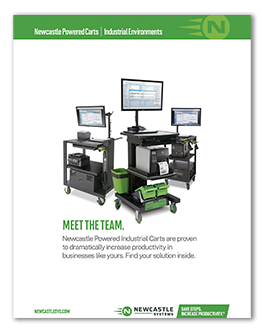

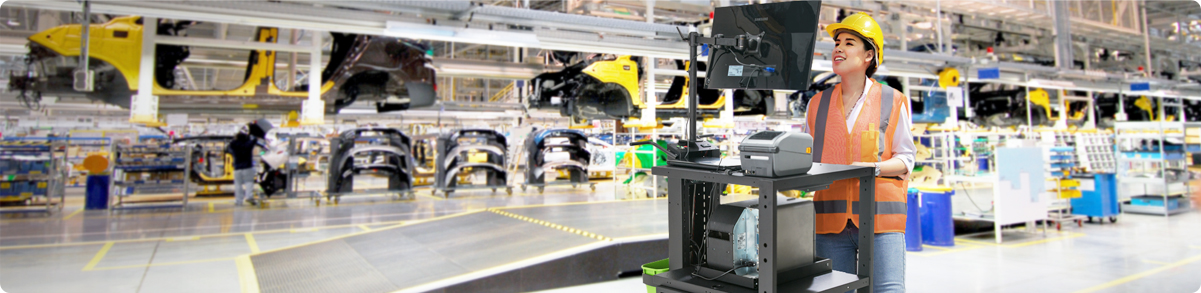
TL;DR: A custom mobile workstation helps warehouses streamline fulfillment by bringing technology, tools, and power directly to the warehouse floor. Instead of relying on fixed stations, mobile workstations allow employees to complete tasks like printing labels, accessing data, and managing inventory wherever the work is happening.
- Key design features that improve mobility, durability, and usability
- Power options that keep workstations running throughout a shift
- Technology integrations like laptops, tablets, and label printers
- Storage, security, and utility upgrades that support daily warehouse tasks
- Customization ideas that help create a more efficient custom workstation for your team
Warehouse and distribution centers rely on efficient fulfillment processes to stay competitive. From inventory storage and order picking to packing and shipping, every step must be fast, accurate, and safe.
Order picking alone can account for 50–75% of total warehouse operating costs, which is why improving picking efficiency is a top priority for distribution centers. That’s where mobile workstations come in.
A mobile workstation allows employees to bring essential technology directly to the warehouse floor. Instead of walking back and forth to fixed terminals to print labels or retrieve data, workers can complete tasks wherever the work is happening.
The result? Less wasted time, faster order fulfillment, and improved operational efficiency.
But not every workstation is the same. One of the biggest advantages of these solutions is the ability to build a custom mobile workstation tailored to your exact warehouse environment.
Below are 10 ways to customize your workstation to create a high performance mobile workstation that supports your fulfillment needs.
1. Heavy-Duty Casters
Mobility is the foundation of any mobile workstation.
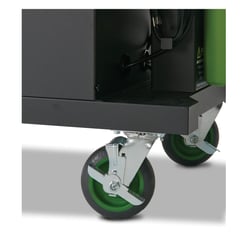 If your workstation doesn’t move smoothly, it can slow down workflows and frustrate employees. The last thing you want is for your nice workstation to perform like a wobbly supermarket shopping cart. High-quality casters ensure your mobile workstation travels easily across warehouse floors.
Look for features like:
- High weight capacity for heavy equipment
- 360-degree swivel ball bearings for smooth turning
- Durable wheels that handle uneven surfaces
- Foot-activated locking mechanisms for stability
These upgrades help your mobile workstation cart move easily through aisles while staying secure during use.
2. Rechargeable Power Options
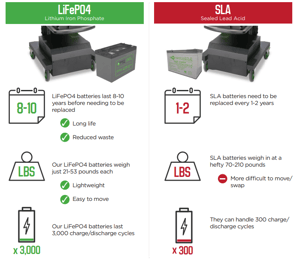 Power is critical for any high performance mobile workstation. Without a power source, the technology on your mobile workstations won’t be of much use. You can add a variety of efficient, reliable, long-lasting, and fast-charging power sources to your equipment.
Two common power options include:
Sealed Lead Acid (SLA)
- Lower upfront cost
- Reliable for basic operations
Lithium Battery Systems
- Up to 8× longer lifespan
- Approximately one-third the weight of SLA batteries
- Faster charging and improved efficiency
While lithium systems require a higher initial investment, they significantly improve the performance and longevity of mobile workstations.
3. Laptops and Tablets
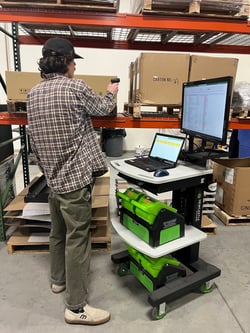 The technology you install determines the capabilities of your mobile workstation. Depending on your operational needs, your workstation can support:
- Laptops
- Tablets
- Ruggedized Toughbooks
- Full desktop computers
Your workstation computer options are only limited by the space and power delivered by the cart you choose.
4. Document and Label Printing
Many warehouse workers walk more than nine miles per shift, and they dread walking back and forth to retrieve documents or print labels. It’s time-consuming and exhausting, not to mention a huge drain on productivity.
A custom mobile workstation cart can be equipped with on-board printers, so employees can generate documents and labels instantly. Whether you need to print picking lists or RFID labels, these are things you can do from anywhere in the warehouse.
5. Extending Work Surfaces
Warehouse environments rarely offer convenient workspace areas. And you can’t always count on a pile of boxes or pallets to be in the right place at the right time to act as a makeshift office. Your custom mobile workstation can ensure your workers have the work surfaces they need to be efficient and productive. For example, rotating and expanding work surfaces can be useful for different types of tasks.
6. Mobile Technology Support
Modern warehouses are increasingly using mobile and wearable technologies to streamline fulfillment. Your mobile workstation can serve as a central hub for charging, storing, and connecting these tools, enabling workers to complete tasks faster and more efficiently.
7. Storage Solutions
Storage is essential for staying organized during a shift. Fortunately, with the right setup, your data will be stored on the cloud, but you may need easy storage for other supplies such as labels, paper, headsets, etc.
A well-designed mobile workstation cart can include multiple storage solutions, such as:
- Pegboards for tools and accessories
- Upper cabinets for equipment
- Shelving for paper, labels, and supplies
With smart storage options, your custom workstation ensures everything workers need is within reach.
8. Security and Locking Devices
Security is another important consideration when designing mobile workstations. If your workstation stores valuable equipment, you may want to add locking mechanisms such as:
- Key or combination locks
- Electronic keycard systems
- Biometric fingerprint locks
These features protect devices and ensure only authorized workers can access sensitive equipment stored in your mobile workstation cart.
9. Other Utility Options
Utility upgrades can make your mobile workstation significantly more practical and safer to use. Consider features like:
- Mounted electrical power strips for easy device charging
- Under-shelf LED lighting for better visibility
- Integrated cable management systems to prevent tangled cords
These additions transform your mobile workstation cart into a highly efficient work platform.
10. Company Branding
Your custom workstation doesn’t just have to be functional—it can also reflect your brand.
Adding logos, colors, and company messaging to your mobile workstation cart helps reinforce internal culture and company values.
Remind your workers what your business stands for, whether it’s delivering a positive customer experience, operating a safe workplace, or being a sustainable organization. Small branding details can strengthen team engagement while creating a consistent look across your operations.
Build an Industrial Mobile Workstation That Fits Your Warehouse Fulfillment Needs
Mobile workstations are far from a one-size-fits-all solution. Every warehouse operates differently, which is why building a custom mobile workstation tailored to your workflow is so valuable.
By combining the right mobility features, power systems, technology integrations, and storage solutions, you can create a high-performance mobile workstation that improves productivity, supports workers, and optimizes fulfillment operations.
The result is a more efficient warehouse and a better experience for the employees who keep it running.
Get the Powered Industrial Carts Product Overview
Ready to build your custom mobile workstation? Get a Quote.