
- Home /
- Data Center Crash Carts
DATA CENTER CRASH CARTS: MOBILE POWERED WORKSTATIONS BUILT FOR UPTIME
Last Updated: 11.22.2026
A data center crash cart is a mobile workstation that brings a monitor, keyboard, laptop or KVM, cables, and tools directly to a server rack so technicians can troubleshoot and restore equipment on the spot. Newcastle Systems’ mobile powered crash carts add all-day lithium battery power, height-adjustable ergonomics, and integrated storage, so technicians work at the rack instead of walking back to a fixed workstation or searching for an outlet.
KEY TAKE-AWAYS
- Downtime is costly. ITIC’s 2024 survey found that 90% of organizations lose more than $300,000 per hour of downtime, and 41% report costs of $1–5 million per hour.
- Traditional crash carts fall short. They are often outlet-dependent, shared or unavailable, and limited in battery life, ergonomics, and storage.
- A mobile powered cart is always ready. A dedicated cart with all-day lithium power supports troubleshooting, commissioning, maintenance, and asset tracking, not just emergencies.
- Fast payback. Newcastle Systems reports a typical payback period of 6–8 months.
- Specified for your site. Newcastle works with operators to specify cart size, battery configuration, device mounting, and quantity, from a single server room to a 200,000 sq ft hyperscale campus.
WHAT IS A DATA CENTER CRASH CART?
A data center crash cart, also called a crash station or KVM cart, is a mobile, all-in-one workstation that brings power, tools, and technology directly to the technician.
Traditionally, a crash cart has been an emergency tool. When remote management, out-of-band networks, or KVM-over-IP are unavailable, a technician rolls the cart to the rack and connects directly to the server console. Today, the highest-performing data center teams use mobile workstations across the full operational life cycle, not only when something breaks.
Distance is the reason it matters. In a modern data center, a single row of racks can span 300 feet, so every trip to a fixed workstation is measured in minutes per incident. Across a team of technicians and a full year, that adds up to thousands of hours.
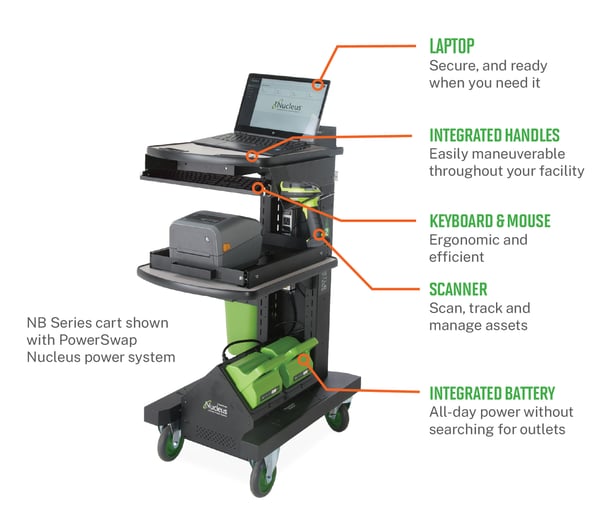
What is on a data center crash cart?
-
- Laptop: secure and ready when you need it
- Monitor, keyboard, and mouse (or KVM): ergonomic and efficient console access
- Barcode scanner: scan, track, and manage assets at the rack
- Label printer: label cables and equipment on the spot
- Storage: cables, adapters, and tools travel with the technician
- Integrated battery: all-day power without searching for outlets
- Integrated handles and cable management: easy to maneuver, with cables organized and secured
WHY DOWNTIME MAKES TECHNICIAN MOBILITY CRITICAL
Unplanned downtime is expensive, and the time a technician spends away from the rack counts against it.
- Cost of downtime: ITIC’s 2024 survey found that 90% of organizations lose more than $300,000 per hour of downtime, with 41% reporting costs of $1–5 million per hour.
- Human error: Uptime Institute research identifies human error as a leading cause of outages, often when technicians leave the point of service to retrieve tools, documentation, or a workstation.
A mobile crash cart keeps everything within reach, which helps reduce errors, improve efficiency, and minimize costly downtime. Every minute a technician walks to a fixed workstation instead of working at the rack is a minute the clock is ticking.
TRADITIONAL CRASH CART VS. NEWCASTLE MOBILE POWERED CART
Traditional crash carts were designed for one scenario: emergency access to servers during an outage. Here is how a Newcastle mobile powered cart compares.
| Feature | Traditional crash cart | Newcastle mobile powered cart |
| Power | Limited battery life | All-day lithium power |
| Availability | Shared or unavailable equipment | Dedicated, ready every time |
| Ergonomics | Poor ergonomics | Height-adjustable and ergonomic |
| Monitor | Fixed monitor | Adjustable monitor positioning |
| Storage | Minimal storage | Ample secure storage (optional) |
| Mobility | Outlet dependent | Truly mobile, outlet independent |
5 Ways Mobile Powered Carts Improve Data Center Operations
Most IT managers think of crash carts as emergency tools, deployed when something breaks. In reality, the highest-performing data center teams use mobile workstations across the full operational life cycle. Here is where they make the biggest difference.
1. Faster troubleshooting
Diagnose problems at the rack instead of returning to a fixed workstation.
2. Reduced downtime
Restore services sooner and keep operations running.
3. Less walking
Technicians stay focused on solving problems, not searching for equipment.
4. Continuous power
Operate for an entire shift without searching for outlets.
5. Everything in one place
Monitor, keyboard, laptop, cables, and tools travel together.
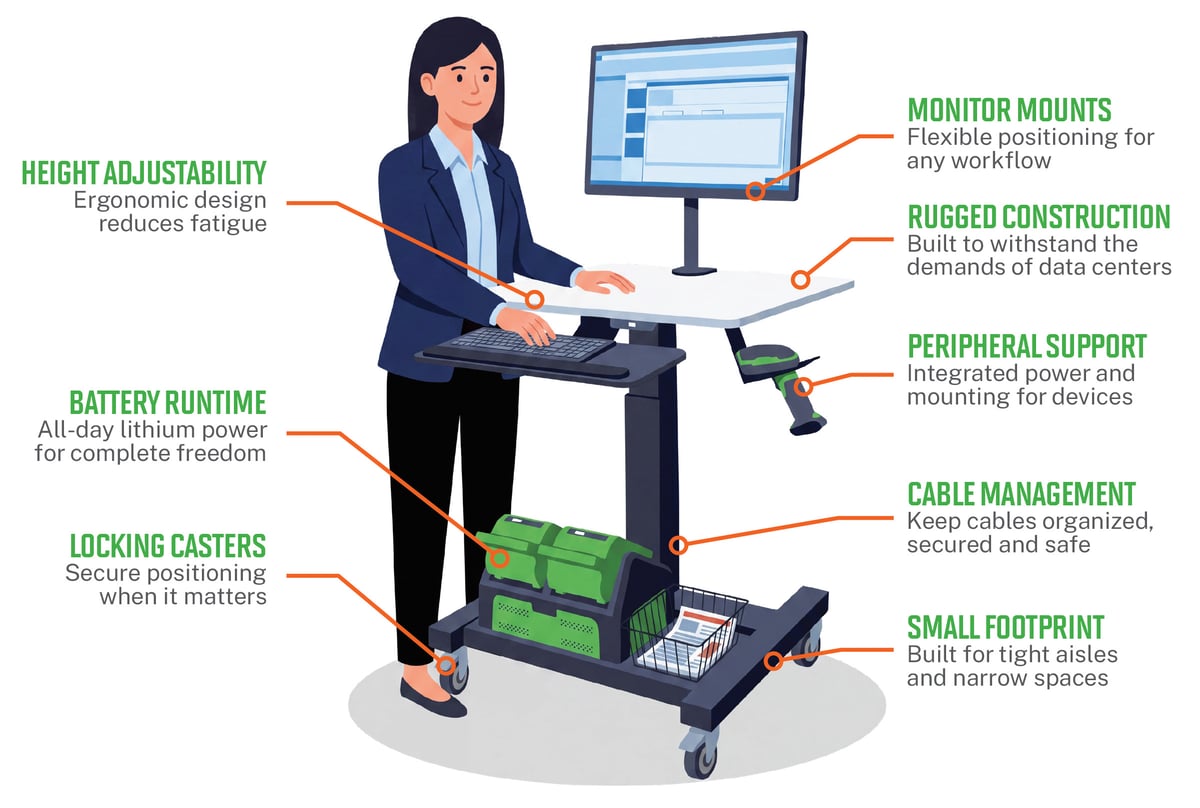
ESSENTIAL FEATURES OF A DATA CENTER CRASH CART
Use this checklist when evaluating any crash cart or mobile workstation.
| Feature | Why it matters |
| Battery runtime | All-day lithium power for complete freedom from outlets |
| Height adjustability | Ergonomic design reduces fatigue |
| Monitor mounts | Flexible positioning for any workflow |
| Rugged construction | Built to withstand the demands of data centers |
| Peripheral support | Integrated power and mounting for devices such as scanners and printers |
| Cable management | Keeps cables organized, secured, and safe |
| Locking casters | Secure positioning when it matters |
| Small footprint | Built for tight aisles and narrow spaces |
DON'T OVERLOOK WEIGHT
A fully loaded crash cart, including a monitor, laptop, KVM, tools, and cables, can exceed 150 lbs. Make sure the cart frame and casters are rated for the actual operating weight, not just the empty cart specification.
HOW TO CHOOSE THE RIGHT DATA CENTER CRASH CART
The traditional crash cart was designed for emergency access during an outage. As data centers have grown more complex, and the range of tasks performed on the floor has expanded, many organizations are moving toward a fully powered mobile workstation designed for everyday operations. Ask these questions before you buy.
-
How long should it run on battery? Match battery capacity to a full shift of the devices you will power, such as the laptop, monitor, scanner, and printer. An outlet-dependent cart stalls incident response when the nearest outlet is aisles away.
-
Will technicians need multiple monitors? If technicians cross-reference documentation, monitoring dashboards, and a server console at once, choose a cart with flexible monitor mounts that can expand with the workflow.
-
Does it fit in narrow aisles? Look for a small footprint, integrated handles, and locking casters so the cart maneuvers through tight aisles yet stays put at the rack.
-
Can accessories be added later? Ask whether scanners, printers, and secure storage can be added after purchase so the cart can grow with your operation.
-
Can batteries be swapped or serviced easily? Confirm that batteries can be swapped or serviced without taking the cart out of service for long. Newcastle’s NB Series cart is shown with the PowerSwap Nucleus power system.
-
Can it support future workflows? Choose a platform built for everyday operations, not only emergency console access, including asset scanning, labeling, and documentation at the rack.
-
Check the weight rating A fully loaded crash cart can exceed 150 lbs. Make sure the frame and casters are rated for the actual operating weight, not just the empty cart specification.
Newcastle Systems works directly with data center operators and IT teams to specify the right solution for your facility, including size, battery configuration, device mounting, and quantity. Whether you are equipping a single server room or a 200,000 sq ft hyperscale campus, Newcastle will get it right before the racks go in.
WHAT IS THE ROI OF A DATA CENTER CRASH CART
*Figures based on actual Newcastle customer data.
Faster response, shorter incidents, and lower costs: the savings come from less time walking for equipment, quicker troubleshooting at the rack, and fewer interruptions caused by dead batteries or missing outlets.
WHO USES, SPECIFIES, AND BUYS DATA CENTER CRASH CARTS?
Crash carts are used wherever technicians maintain racks of equipment. One U.S. data center tracker counted 3,687 operational facilities in July 2026, with 229 more under construction and 857 planned. Most of those sites rely on hands-on technicians, and many of them need dedicated carts.
Facilities and industries that benefit
| Facility type | How mobile powered carts help |
| Enterprise data centers | Improve uptime and technician efficiency |
| Cloud providers | Scale operations with mobile agility |
| Colocation facilities | Support more clients with fewer resources |
| Universities | Empower IT teams across campus infrastructure |
| Government | Ensure mission-critical systems stay online and secure |
| Research labs | Enable innovation with reliable infrastructure |
Who is involved in the decision?
| Role | Typical titles | Part in the decision |
| Users | Data center technician; remote hands technician; NOC engineer; field engineer; systems administrator | Use the cart every day at the rack and shape what “good” looks like |
| Recommenders | Data center operations manager; critical facilities manager; IT infrastructure manager; commissioning manager; design-build engineer | Define the standard kit for technicians across one or many sites |
| Buyers | IT or facilities procurement; FF&E coordinator and construction team on new builds | Source and purchase carts, often as part of a refresh or a new facility |
When do data centers buy crash carts?
-
-
-
Commissioning a new facility or data hall, ideally before the racks go in
-
Refreshing aging carts that are shared, outlet-dependent, or out of service
-
Standardizing equipment across multiple sites
-
After an incident exposed a missing, broken, or underpowered cart
-
-
FREQUENTLY ASKED QUESTIONS ABOUT DATA CENTER CRASH CARTS
What is a crash cart used for in a data center?
Technicians use a crash cart for direct, physical access to servers and network equipment when remote management is unavailable. They also use it for everyday work at the rack, such as troubleshooting, equipment commissioning, maintenance, and asset scanning. Keeping the workstation at the rack avoids walking back to a fixed desk, which shortens incident response.
What should a data center crash cart include?
A well-equipped crash cart includes a secure laptop, a monitor with keyboard and mouse (or a KVM), cable management, storage for cables and tools, and a reliable power source. Many teams also add a barcode scanner and label printer for asset tracking. Look for height adjustability, locking casters, integrated handles, a small footprint for narrow aisles, and a frame rated for the fully loaded weight.
Why do data centers still need crash carts if they have remote management?
Remote tools such as out-of-band management and KVM-over-IP depend on the network and management systems being available. A crash cart provides direct physical console access that does not depend on them, so it remains the last-resort option when remote access fails. It also supports hands-on work at the rack that remote tools cannot do, such as cabling, hardware swaps, and asset verification.
What is the difference between a traditional crash cart and a mobile powered workstation?
A traditional crash cart is typically built for emergency console access and is often outlet-dependent, shared, or short on battery life, ergonomics, and storage. A mobile powered workstation, like Newcastle’s, is a dedicated cart with all-day lithium power, height-adjustable ergonomics, adjustable monitor positioning, and optional secure storage, designed for everyday operations as well as emergencies.
How long does a battery-powered crash cart run?
Newcastle’s lithium power systems are designed to run a full shift without searching for an outlet. Actual runtime depends on the battery configuration and the devices powered, such as a laptop, monitor, scanner, and printer, so Newcastle specifies the battery configuration to match your workflow.
How much weight should a crash cart be able to carry?
A fully loaded crash cart, including a monitor, laptop, KVM, tools, and cables, can exceed 150 lbs. Check that the cart frame and casters are rated for the actual operating weight, not just the empty cart specification.
Will a crash cart fit in narrow data center aisles?
Choose a cart with a small footprint, integrated handles, and locking casters. These features let technicians maneuver through tight aisles and along rack rows that can span 300 feet, then lock the cart in place at the rack. Newcastle sizes the cart to your facility during the specification process.
How many crash carts does a data center need?
There is no universal ratio. The right number depends on facility size, the number of data halls, technician headcount, and shift overlap. A practical starting point is one dedicated cart per data hall or technician team, so equipment is never shared or unavailable when an incident occurs. Newcastle helps specify quantity along with size, battery configuration, and device mounting.
What is the ROI of a mobile powered crash cart?
Newcastle Systems reports a typical payback period of 6 to 8 months, a 20 to 30 percent increase in technician productivity, and a 70 to 90 percent reduction in time spent walking for equipment. The savings come from faster troubleshooting, shorter incidents, and less technician time spent retrieving tools or searching for outlets.
Who buys and specifies data center crash carts?
Technicians and NOC engineers use them daily. Data center operations managers, critical facilities managers, and IT infrastructure managers typically recommend and standardize the equipment, and procurement teams purchase it. On new builds, commissioning managers and FF&E coordinators often specify carts before the racks go in.
Can Newcastle customize a crash cart for my facility?
Yes. Newcastle Systems works directly with data center operators and IT teams to specify the right solution, including cart size, battery configuration, device mounting, and quantity. That applies whether you are equipping a single server room or a 200,000 sq ft hyperscale campus.
READY TO MODERNIZE YOUR DATA CENTER?
Let’s build the right mobile workstation solution for you. Newcastle Systems will specify the cart size, battery configuration, device mounting, and quantity for your facility.
SOURCES
-
-
-
Uptime Institute, Annual Outage Analysis.
-
US Data Center Map, “How Many Data Centers Are in the US?” (July 2026).
-
Newcastle Systems,“The Complete Guide to Data Center Crash Carts” eBook (2026).
-